You will be notified about any service issues almost immediately. If you have not received a notification, everything is working as expected. Now, to the point.
Quick Check#
Any domain in the service responds to certificate generation service pings at the following address:
http://<domain>/.well-known/acme-challenge/ping it should respond with pong
This can be used for a quick check that the domain is configured correctly.
Node#
Check node availability.
To do this, simply open the node’s IP in a browser.

This is a good response: the node is alive, connected to the master, and ready to serve traffic.
If you receive any other response, we recommend rebooting the node through the hosting panel or console. If that doesn’t help, contact us for assistance.
Domain#
Whois#
First, check that the domain is actually alive. To do this, check whois.
Here is what a live domain’s information looks like:

And here is a dead one:

However, if your domain has been deactivated, it may still appear alive but no longer function!
Ping It#
For a final check of domain functionality, ping it.
Open the console:
On Windows: **Windows+R to **open “Run”. Type “cmd” and click “OK”
On macOS: click the **Launchpad **icon in the Dock, type “Terminal” in the search field, then click “Terminal”.
Type in the opened window ping <your domain>

This is a good response: the domain is responding.
But it’s important that the IP responding to our requests is the IP OF OUR NODE!
And this is a bad response. This response means the domain is completely unknown: either just registered or already deleted.

If the domain responds but not with our IP, then either it has been undelegated (due to an abuse complaint, for example), or the records for the domain are set incorrectly.
NS Records#
For the service to work, only one record is minimally required. If you use subdomains, at least two records are needed.
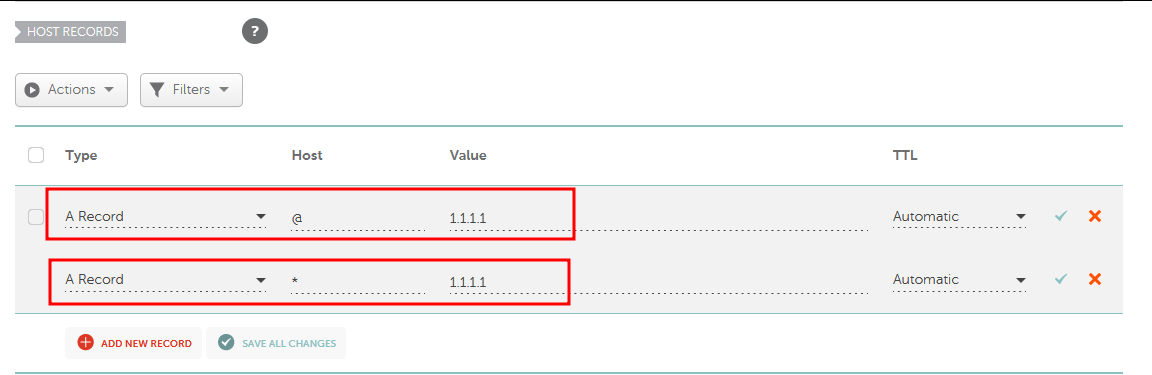
This way, the domain root will be bound to our node (1st record). And the second one binds ALL subdomains to our node.
Some registrars do not support wildcard records!
NS Update#
After registering a domain or editing records, some time is required for these changes to propagate across global servers. This takes anywhere from 15 minutes to a full day. So if you expect changes to work immediately — no, that’s not how it works. You need to wait.
Your certificates will be generated at the first opportunity: the system regularly checks the queue and generates them wherever possible.