PrivateFlare issues certificates automatically, and we notify you about any issues on the service side almost immediately. If there was no notification, the service is operating normally and the cause lies in the node or domain settings. The checks below will help you find it in a few minutes.
Quick Check#
Any domain in the service responds to requests from the certificate generation service at the following address:
http://<domain>/.well-known/acme-challenge/ping
The response should be pong.
This is the fastest way to make sure the domain is configured correctly.
Node#
Check the node’s availability: open its IP in a browser.

This is the correct response: the node is running, connected to the master, and ready to serve traffic.
If you get any other response, reboot the node through the hosting panel or console. If that does not help, contact us — we will help.
Domain#
Whois#
First, make sure the domain is active — check its whois.
This is what the information for an active domain looks like:

And this is an inactive one:

Keep in mind: if a domain has been deactivated, it may still look active in whois while no longer working.
Ping#
For a final check, ping the domain.
Open the console:
- On Windows: press Windows+R to open the “Run” window, type cmd, and click OK.
- On macOS: click the Launchpad icon in the Dock, type “Terminal” in the search field, and launch “Terminal”.
In the window that opens, type ping <your domain>.

This is the correct response: the domain is responding.
It is important that the IP responding to the requests is the IP of your node.
A response like this means the domain is unknown: it has either just been registered or has already been deleted.

If the domain responds, but not from your node’s IP, then either it has been undelegated (for example, following a complaint) or its DNS records are set incorrectly.
DNS Records#
A single record is enough for the service to work. If subdomains are used, at least two are needed.
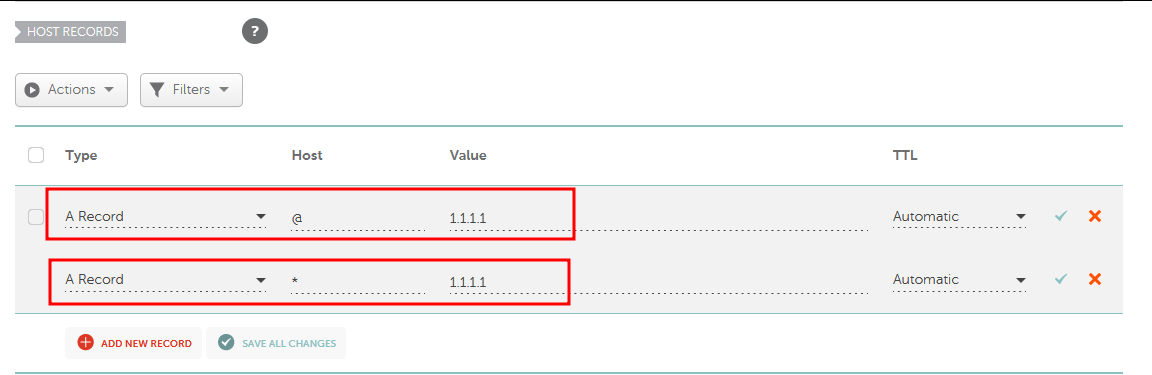
The first record binds the domain root to the node; the second binds all of its subdomains.
Keep in mind: some registrars do not support wildcard records.
DNS Update#
After a domain is registered or its records are changed, it takes time for the changes to propagate across DNS servers worldwide — from 15 minutes to 24 hours. The domain may not start working right after the records are edited: this is normal, and you need to wait.
The certificates will be issued at the first opportunity: the system regularly checks the queue and generates them as soon as it becomes possible.