Before You Begin#
Before adding domains, update your NS records in advance. Set up A records at your registrar pointing to the node’s IP address to minimize propagation delays.
The setup involves two IP addresses: the backend server (tracker) IP and the node (VPS) IP. A records should point to the node IP, while the domain properties should contain the backend IP.
Overview#
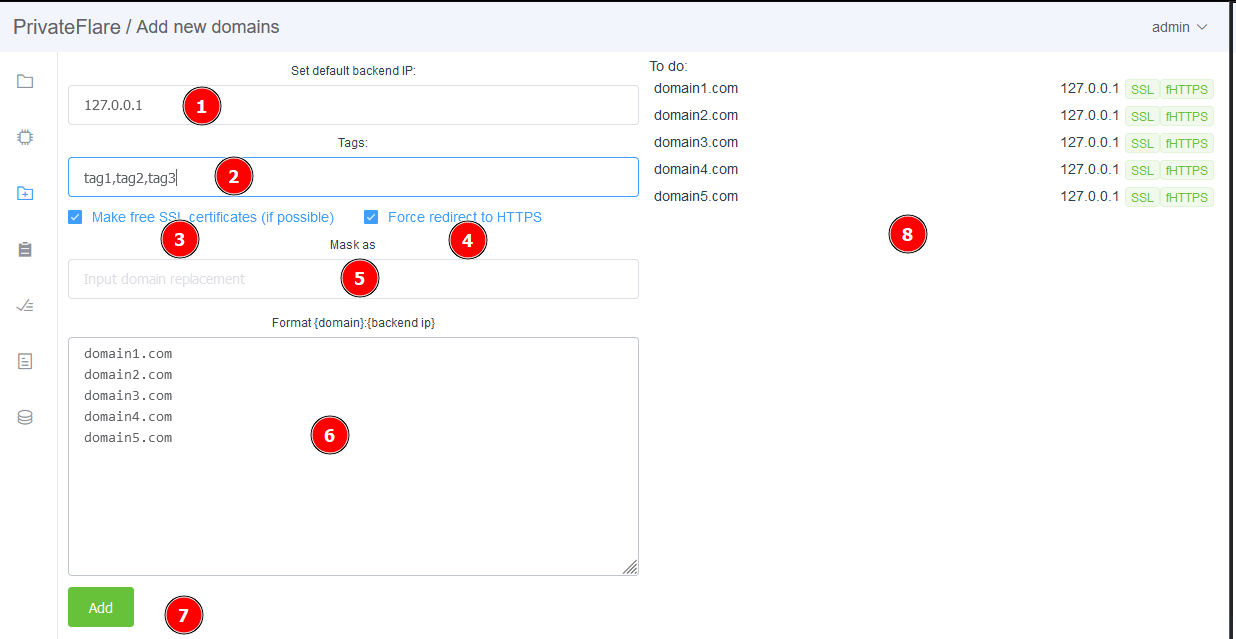
The domain addition interface includes eight key components:
- Backend server IP address
- Tags (comma-separated)
- SSL certificate generation
- HTTP to HTTPS redirect toggle
- Domain masking
- Domain input field
- Add button
- Task preview panel
Main Parameters#
Backend IP: Enter the IP of your proxied server (web server, tracker, etc.).
Tags: Organize domains by purpose, team members, or clients using comma-separated labels for filtering.
SSL Certificates: Generate certificates when HTTPS support is needed.
Auto-redirect: Automatic HTTP to HTTPS redirection, enabled by default.
Domain Masking#
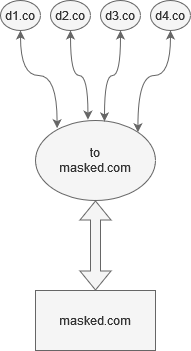
This feature substitutes domain names during transmission. It is useful when multiple domains need to be routed through software that supports only one domain. Requests arrive at the node under their original domains, get rewritten to the masked domain, are forwarded to the backend, and return with the original domains in the responses.
The backend processes the request without knowing the original domain.